CSS Syntax
A CSS rule-set consists of a selector and a declaration block:
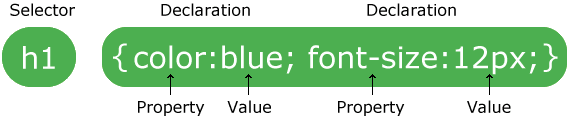
The selector points to the HTML element you want to style.
The declaration block contains one or more declarations separated by semicolons.
Each declaration includes a CSS property name and a value, separated by a colon.
A CSS declaration always ends with a semicolon, and declaration blocks are surrounded by curly braces.
The Types of CSS:
1)Inline 2)Internal 3)External
1)inline syntax:
- Inline means all the properties are contain in one line.
- An inline style may be used to apply a unique style for a single element.
<div style="width:100px;height:100px;border:1px solid black">
2)internal syntax:
- An internal style sheet may be used if one single page has a unique style.
- Internal styles are defined within the <style> element, inside the <head> section of an HTML page:
<!DOCTYPE html>
<html>
<head>
<style>
body {
background-color: linen;
}
h1 {
color: maroon;
margin-left: 40px;
}
</style>
</head>
<body>
<h1>This is a heading</h1>
<p>This is a paragraph.</p>
</body>
</html>
3)External syntax:
- With an external style sheet, you can change the look of an entire website by changing just one file!
- Each page must include a reference to the external style sheet file inside the <link> element.
<!DOCTYPE html>
<html>
<head>
<link rel="stylesheet" type="text/css" href="mystyle.css">
</head>
<body>
<h1>This is a heading</h1>
<p>This is a paragraph.</p>
</body>
</html>
SOME NEW CSS3 PROPERTY
- CSS Trasition
- CSS Animation
Css Trasition:
- what does transition means in simple word --> to change / switch
- suppose we have a div and we have to change its property than we can apply transition effect to it.
- for that we have to make 2 diffrent style for it ex (style A) and (style B)
- IN style A what ever we write css property will be applied normally, as soon as the page will be load this property will be applied to it
- And in style B the property that we have written will work in hover.
- Now we have to apply transition effect to see the changes
- In styleA we keep the Transition values inside it.. Now we have to see what are the transition values
- transition-property
- transition-delay
- transition-duration
- transition-timing-function
example:
<!DOCTYPE html>
<html lang="en">
<head>
<meta charset="UTF-8">
<title>Transition</title>
<style>
div{
width:150px;
height:150px;
padding:25px;
background: #ff6600;
text-align:justify;
position: absolute;
top: 15%;
left:25%;
border-radius:200px;
/* we write transiton values inside normal style*/
/*transition:[transition property][delay][transition-timing-function] [transition-duration]*/
transition:all linear 2s;
}
div:hover{
top :55%;
background: #f00;
box-shadow: 0 0 35px 15px #f00;
}
</style>
</head>
<body>
<div>
</div>
</body>
</html>
CSS Animation:
Animation means changing the current property or position of an element/object to another property or position with respect to time.
to use css3 animation we have to create it by using
@keyframes animationName {
/* animation */
}
example:
<!DOCTYPE html>
<html lang="en">
<head>
<meta charset="UTF-8">
<title> Animation </title>
<style>
#object{
width:200px;
height:200px;
background-color: #353535;
line-height: 150px;
color:#fff;
font-size:20px;
text-align: center;
margin:15% 0 0 45%;
animation-name:sampleAnimate;//name should be same
animation-duration:3s;
animation-iteration-count:5;
animation-direction:reverse;
animation-timing-function:linear;
}
@keyframes sampleAnimate {
/*our animation */
from {border-radius:0;} /*we can give additional property also her */
to{border-radius:50%;
background-color: red;
font-size: 24px;
transform:rotate(-30deg);
}
}
</style>
</head>
<body>
<div id="wrapper">
<div id="object"> Hello Animation </div>
</div>
</body>
</html>
<html lang="en">
<head>
<meta charset="UTF-8">
<title>Transition</title>
<style>
div{
width:150px;
height:150px;
padding:25px;
background: #ff6600;
text-align:justify;
position: absolute;
top: 15%;
left:25%;
border-radius:200px;
/* we write transiton values inside normal style*/
/*transition:[transition property][delay][transition-timing-function] [transition-duration]*/
transition:all linear 2s;
}
div:hover{
top :55%;
background: #f00;
box-shadow: 0 0 35px 15px #f00;
}
</style>
</head>
<body>
<div>
</div>
</body>
</html>
CSS Animation:
Animation means changing the current property or position of an element/object to another property or position with respect to time.
to use css3 animation we have to create it by using
@keyframes animationName {
/* animation */
}
example:
<!DOCTYPE html>
<html lang="en">
<head>
<meta charset="UTF-8">
<title> Animation </title>
<style>
#object{
width:200px;
height:200px;
background-color: #353535;
line-height: 150px;
color:#fff;
font-size:20px;
text-align: center;
margin:15% 0 0 45%;
animation-name:sampleAnimate;//name should be same
animation-duration:3s;
animation-iteration-count:5;
animation-direction:reverse;
animation-timing-function:linear;
}
@keyframes sampleAnimate {
/*our animation */
from {border-radius:0;} /*we can give additional property also her */
to{border-radius:50%;
background-color: red;
font-size: 24px;
transform:rotate(-30deg);
}
}
</style>
</head>
<body>
<div id="wrapper">
<div id="object"> Hello Animation </div>
</div>
</body>
</html>

No comments:
Post a Comment